Guide · Home security
Online security basics: the five layers that actually matter
Advertising disclosure
pravator.online is funded by advertising. This page carries a partner link in the sidebar: if you buy after following it, we receive a commission from the advertiser, at no extra cost to you and with no effect on what is written here. We are not affiliated with any security vendor. See the affiliate disclosure.
Most advice about staying safe online is either a product advertisement or a list of forty things nobody will do. This is the short version: five layers, in order of how much protection they buy for the effort, with an honest note about which of them you can get for nothing.
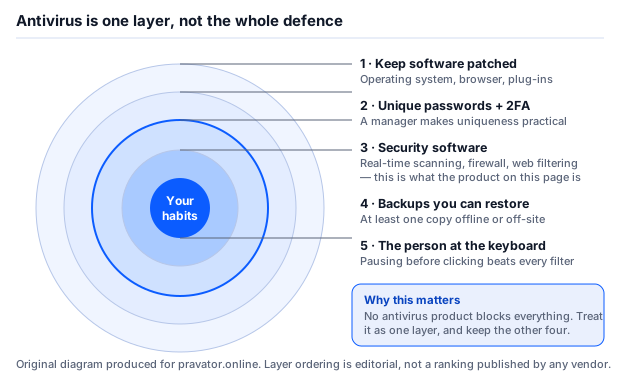
1. Keep everything patched
The single highest-value habit, and the most boring. A very large share of successful consumer compromises exploit a vulnerability for which a fix already existed. The attacker is not using a secret; they are using the gap between the patch being published and you installing it.
- Turn on automatic updates for your operating system and let them install. The reboot is annoying; the alternative is worse.
- Do the same for your browser, which is the piece of software most exposed to hostile input.
- Uninstall what you do not use. Software you never open still has vulnerabilities, and unused browser extensions are a recurring problem because they can be sold to a new owner who changes what they do.
- When a device stops receiving security updates, it is no longer a secure device, whatever it says on the box. That applies to phones, routers and network storage as much as to computers.
2. Unique passwords, plus two-factor authentication
Reused passwords are what turn one company’s breach into your problem. When a service is breached and its password database is published, attackers replay those pairs against every other popular service — this is called credential stuffing, and it works because most people reuse.
- Every account gets a different password. This is only practical with a password manager, which is precisely why password managers are bundled with security suites and built into every browser.
- Turn on two-factor authentication wherever it is offered, starting with your email account. Your email is the reset route for everything else; whoever controls it controls the rest.
- Prefer an authenticator app or a hardware key over SMS. SMS codes can be intercepted by SIM-swapping. SMS is still far better than nothing.
- Check whether your address appears in known breaches. Reputable free services let you search your own email address. Paid “dark web monitoring” features do broadly the same thing continuously; whether that is worth paying for is a judgement, not a necessity.
3. Security software
This is the layer the advertising is about, and it is genuinely useful — it is simply not the whole answer. A current security product gives you real-time scanning of files as they arrive, a firewall, and blocking of known phishing and malware-hosting sites in the browser.
It does not patch your software, make your passwords unique, or recover files that have already been encrypted. Treat it as one layer among five.
Our detailed look at one product — including what its entry tier does not include — is in the Norton AntiVirus Plus review, which also explains how detection engines actually work.
4. Backups you can actually restore
If you do exactly one thing from this page, do this one. Backups are the only layer that works after everything else has failed — and ransomware is specifically a bet that you have no usable backup.
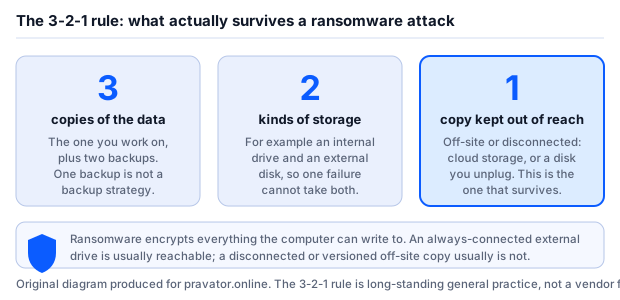
Three copies, on two kinds of storage, with one kept out of reach. The last part is the part people skip and the part that matters: ransomware encrypts everything the compromised machine can write to, which normally includes the external drive that is permanently plugged in. The copy that saves you is the one that was disconnected, or the one held somewhere with version history the attacker does not control.
And test it. A backup you have never restored from is a hypothesis, not a backup. Restore one folder, once, and confirm the files open.
5. The person at the keyboard
Every filter in the world is defeated by a person who wants to open the attachment. The habits worth building are small:
- Pause on anything urgent. Urgency is the most reliable marker of a scam, because it exists to stop you checking. Nothing legitimate is destroyed by a ten-minute delay.
- Never act on a link in an unexpected message. Go to the site yourself.
- Treat unexpected attachments as hostile, including from people you know — their account may be the compromised one.
- Download software from the vendor, not from a search advertisement. Malicious ads for popular free software are a persistent problem.
- Be suspicious of anyone asking you to install remote-access software to “fix” a problem you had not noticed. That is the core of the tech-support scam.
Recognising a phishing message
Phishing is the common thread through most of the above. Security-software renewal notices are a favourite disguise, because they are expected, they carry a payment link and they create anxiety.
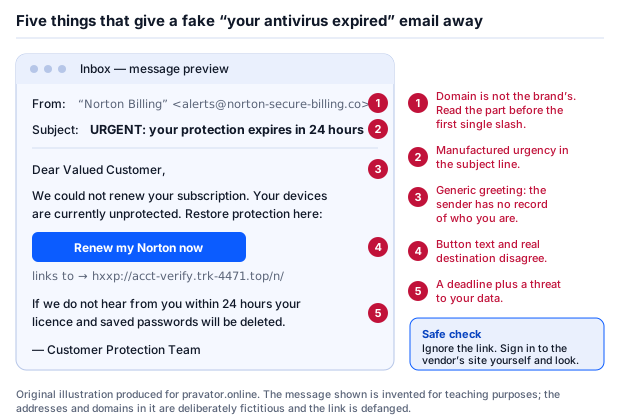
Read the sender’s domain, not the display name — the display name is free text an attacker chooses. Look at the real destination of a link before following it, by hovering on a computer or long-pressing on a phone. And remember that the modern generation of these messages has no spelling mistakes: the absence of bad grammar proves nothing.
Do you actually need to pay for security software?
An honest answer on a page that earns commission from a security vendor: often, no.
Windows includes Microsoft Defender, enabled by default, updated through Windows Update and tested by the same independent laboratories as the paid products. macOS includes XProtect and Gatekeeper. Neither is a placeholder, and neither costs anything.
Reasonable reasons to pay anyway: you want the extra components bundled with a suite — a password manager, a VPN, parental controls, breach monitoring — and would rather buy them together than separately; you want a single interface across several machines; you want a vendor with a support line to call. Those are real reasons.
The reason that is not real is fear. “Your computer is unprotected” is not true of a current, patched Windows machine, and any page that tells you it is wants something from you.
Sources
- ENISA (European Union Agency for Cybersecurity) — annual Threat Landscape reporting on the prevalence of phishing, ransomware and social engineering.
- Europol — Internet Organised Crime Threat Assessment (IOCTA).
- AV-TEST Institute, AV-Comparatives and SE Labs — published methodologies and results for consumer endpoint protection, including tests of the protection built into operating systems.
- Vendor documentation for the operating-system security features described above.
This page gives general information, not advice tailored to your circumstances, and it contains no statistics we could not source. Where it diverges from a vendor’s own current documentation, the vendor’s information prevails. Corrections to info@pravator.online — see the corrections procedure.
Written by Sandra Moore. Published 22 September 2026. Reviewed at least every six months.